Production AWS EKS Deployment: Architecture, Security, CI/CD and Cost Optimization

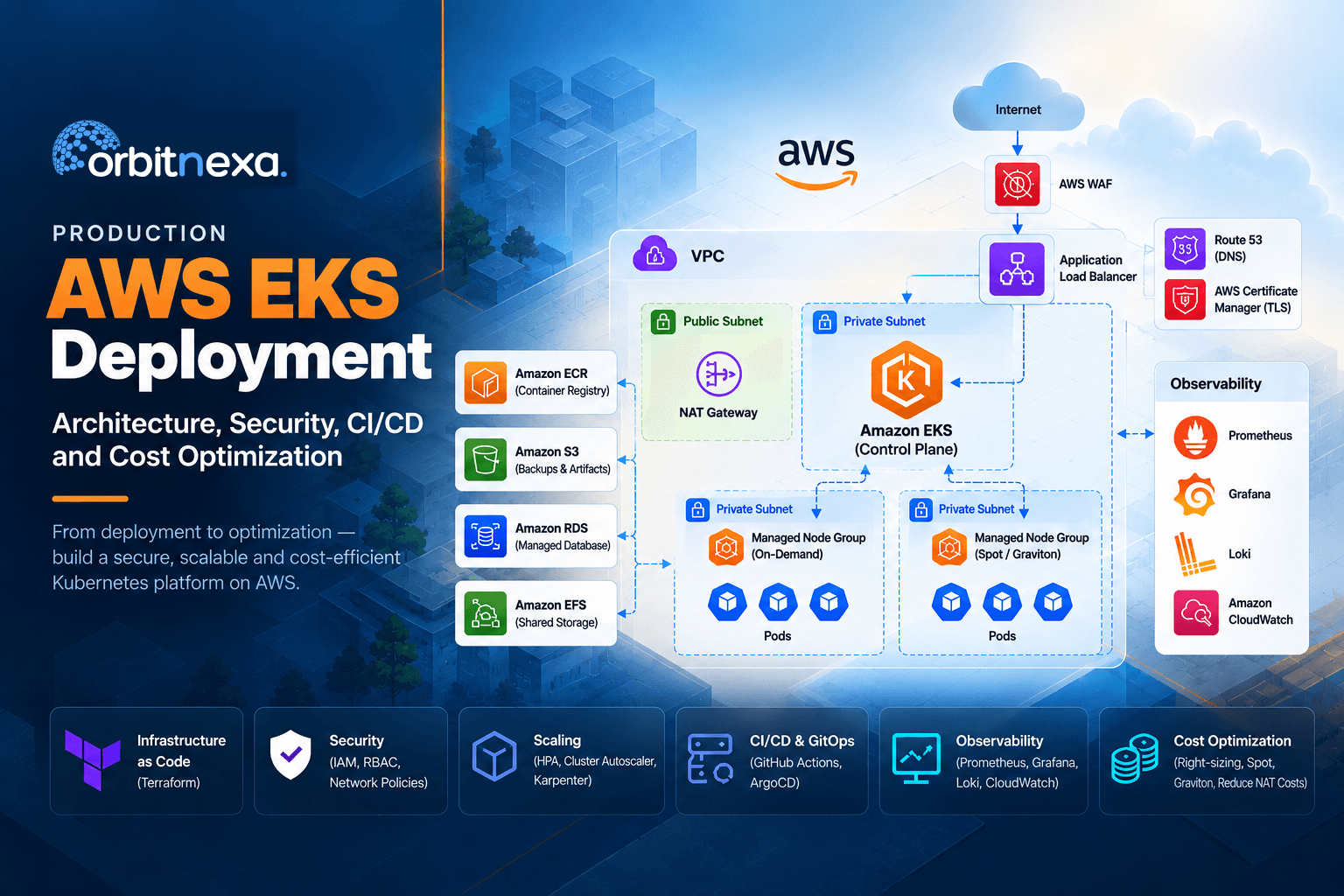
A practical guide to production AWS EKS covering architecture, networking, security, CI/CD, autoscaling, observability and cost optimization beyond EC2.
Introduction
Creating an EKS cluster takes about fifteen minutes. Running one in production is a different job.
The gap is where the work lives: network layout, IAM, node sizing, ingress, TLS, autoscaling, observability, delivery, security, backup, upgrades, and the cost management tying it together. None of it is exotic. It's just rarely finished before the first production workload lands.
What shows up six months later is familiar. Nodes at 20% CPU because requests were copied from a tutorial. A NAT Gateway line item nobody can explain. An upgrade deferred twice because nothing is documented well enough to risk it.
This guide covers the decisions behind a production EKS platform, with opinions where we have them.
1. What a Production EKS Deployment Actually Involves
A cluster is one resource. A platform is considerably more, and the layers interact — tuning one in isolation usually relocates the problem rather than solving it.
AWS Cloud
└─ VPC
   ├─ Public subnets   →  ALB · NAT Gateway
   └─ Private subnets  →  EKS worker nodes
                          ├─ Application pods  →  Services  →  Databases / AWS services
└─ Platform pods → Monitoring · Ingress| Layer | Typical components |
|---|---|
| Infrastructure | VPC, public/private subnets, route tables, NAT or alternative egress, security groups, IAM, EKS, node groups, EBS/EFS |
| Kubernetes | Namespaces, RBAC, Services, Ingress, requests/limits, ConfigMaps, Secrets, persistent storage, security controls |
| AWS integration | AWS Load Balancer Controller, EBS CSI driver, IAM roles for service accounts, Route 53, ACM, CloudWatch, ECR |
| Delivery | GitHub Actions or Jenkins, registry, image scanning, Helm, Argo CD/GitOps |
| Observability | Prometheus, Grafana, Loki, CloudWatch, alerting |
| Operations | Scaling, backups, upgrades, incident response, DR, cost management |
The common mistake is treating cost as something you visit at the end. Networking decisions made in week one set your NAT bill for two years.
2. Start With Workload Assessment
Most clusters get sized backwards: pick an instance type, then discover what fits. Do it the other way and the node strategy falls out of the answers.
| Area | Questions to answer |
|---|---|
| Compute | How many applications? Average and peak CPU/memory? CPU-bound, memory-bound, batch, or GPU? |
| Traffic | Normal and peak volume? Predictable, or spiky in ways autoscaling must react to? |
| Availability | Business-critical? Multi-AZ? What are the RTO/RPO numbers, and has anyone tested them? |
| Storage | Stateless? Persistent volumes? High IOPS? Shared across pods? |
| Security | Regulated data? Which services need access? Private endpoints or specific encryption controls? |
| Operations | Who owns the cluster at 3am? How will upgrades happen? What alerts actually page someone? |
One question matters more than the rest: how many pods per node do you expect? EKS caps pods per node on available ENIs and IP addresses, not CPU. An m5.large tops out at 29 pods however idle its cores are. Run many small pods and you'll hit that ceiling long before you exhaust compute, paying for cores you can't schedule onto. VPC CNI prefix delegation raises the limit and is worth enabling before deciding you need bigger instances.
3. Design the Network Before the Cluster
Subnets, CIDR sizing and egress paths are effectively permanent once workloads run.
Internet  →  CloudFront  →  ALB  (public subnets, 2 AZ)
                             ↓
                      Private subnets
                      ├─ AZ-a  →  EKS node  →  pods
                      └─ AZ-b  →  EKS node  →  pods
Worker nodes belong in private subnets. This is closer to a default than a preference — public IPs on nodes buy nothing in a normal architecture and widen the attack surface for no return.
Size subnets for pods, not nodes. With the VPC CNI every pod takes a VPC IP. A /24 sounds generous until you're running 200 pods per AZ and the cluster won't schedule because the subnet is exhausted. Expanding CIDRs afterwards is possible but unpleasant.
Egress is where the bill hides. Private workloads still need image pulls, AWS API calls and package downloads. NAT Gateway is the usual answer and the usual surprise — section 12.7 has the arithmetic, but decide it here while the routing is still a diagram.
4. Infrastructure as Code With Terraform
Terraform should own the VPC, subnets, route tables, IAM, EKS, node groups and security groups.
terraform/
├─ modules/       →  vpc · eks · iam · security
├─ environments/  →  dev · staging · prod
└─ backend/
Remote state with locking, separate state per environment, pinned provider and module versions, and plans reviewed through CI rather than applied from a laptop.
Decide early whether Terraform also manages in-cluster resources. It can, through the Kubernetes and Helm providers, but you end up with two systems reconciling the same objects. We draw the line at the cluster boundary: Terraform owns AWS, Argo CD owns what runs inside.
5. Node Strategy
Separate system components from application workloads. When an application pod triggers a scale-down you don't want CoreDNS moving with it.
EKS
├─ System node group       →  CoreDNS · kube-proxy · platform components
└─ Application node group  →  application pods
Add further capacity pools only when a workload needs one — memory-optimized for caches and JVM services, compute-optimized for CPU-bound work, Spot for interruptible batch. Every extra node group is another thing to patch and reason about during an upgrade.
Taint the system group and give platform components the matching toleration. Without it, application pods land there eventually, usually at the worst time.
6. Resource Requests and Limits
This is the largest source of wasted spend we see in EKS clusters, and it costs nothing to fix.
resources:requests:cpu: "2"memory: "4Gi"limits:memory: "4Gi"
The scheduler places pods on requests, not actual usage. If pods request 2 vCPU and use 300m, the scheduler fills nodes on the 2 and you buy capacity nothing touches. A cluster at 25% utilisation with "full" nodes is almost always this.
Three positions we'll commit to:
Set requests from observed usage. Take p95 over a representative fortnight from Prometheus or Metrics Server and set requests slightly above it. Vertical Pod Autoscaler in recommendation mode generates a reasonable first pass without applying anything.
Set memory limits equal to memory requests. Memory is incompressible — a pod over its limit gets OOMKilled regardless, so a limit above the request only lets the node oversubscribe into instability.
Think hard before setting CPU limits at all. CPU is compressible, and a CPU limit throttles the container through CFS quota even when the node has idle cores. We've seen latency chased for weeks that turned out to be throttling on a limit nobody remembered setting. Requests give you scheduling fairness; limits mostly give you throttling.
Requests drift as applications change. Review them on a cadence.
7. Autoscaling: HPA, Cluster Autoscaler and Karpenter
Two layers, failing in different ways.
Pods   Traffic rises  →  metric crosses threshold  →  HPA adds replicas
Nodes  Pending pods   →  no capacity  →  node provisioned  →  pods scheduled
For most new clusters, use Karpenter. It provisions nodes directly from pending pod requirements rather than scaling pre-defined ASGs, so it picks instance types to fit the workload instead of the reverse. It consolidates underused nodes automatically and removes the chore of a node group per instance family.
Cluster Autoscaler stays the right call in two cases: you already have a mature node-group-per-workload setup that works, or you need the strict placement boundaries some regulated environments want to point at in an audit.
What bites with Karpenter is consolidation moving pods you didn't expect to move. Use PodDisruptionBudgets on anything stateful and the karpenter.sh/do-not-disrupt annotation on pods that can't be rescheduled mid-run. Batch jobs are the usual casualty.
Either way, set topologySpreadConstraints. Both autoscalers will happily pack a deployment onto one node in one AZ if nothing says otherwise, and you'll find out during an AZ event.
8. Ingress, Load Balancing and TLS
User → Route 53 → ALB (ACM certificate) → Ingress → Service → PodUse IP target mode rather than instance mode — traffic goes straight to pod IPs instead of hopping through kube-proxy, which removes a layer and improves health-check accuracy.
Terminate TLS at the ALB so ACM handles renewal.
9. Security Architecture
| Layer | Controls |
|---|---|
| AWS | IAM, security groups, VPC controls, private subnets, encryption, CloudTrail, KMS, WAF for internet-facing apps |
| Kubernetes | RBAC, namespaces, network policies, pod security standards, service accounts, secrets management |
| Container | Minimal base images, image and dependency scanning, vulnerability management, signed images where required |
Use IAM Roles for Service Accounts, or EKS Pod Identity on newer clusters, rather than attaching permissions to the node role. Node-role permissions are available to every pod on that node, including anything compromised.
Network policies are worth the effort but need a CNI that enforces them — the VPC CNI supports them from 1.14, and Calico remains a common alternative. Default-deny per namespace, then allow explicitly.
Commit → Build → unit tests · SAST · container scan → Registry → Deploy10. CI/CD and GitOps
Separate the build from the deploy. CI produces an image and updates a manifest; a reconciler applies it.
Developer  →  GitHub  →  CI (test · SonarQube · Trivy)  →  Registry
                                                            ↓
                                   EKS  ←  Argo CD  ←  GitOps repository
Cluster state becomes readable from Git rather than reconstructed from kubectl, rollback is a revert, and nobody needs cluster-admin to ship. The cost is a second repository and a reconciliation loop to understand when something won't sync.
Use immutable image tags. A pipeline pushing :latest with imagePullPolicy: Always gives you deployments you can't reproduce and rollbacks that don't roll anything back.
11. Observability
Cover infrastructure signals (CPU, memory, disk, network, node conditions), Kubernetes signals (pod restarts, pending pods, scheduling failures, requests versus usage), application signals (latency, throughput, errors) and logs.
EKS  →  Prometheus (metrics) ┐
        Loki (logs)          ├→  Grafana  →  Alerts
        Kubernetes events    ┘
The metric most clusters don't track and should is requests versus actual usage per namespace. It's the input to every rightsizing decision in section 12.
Ship Kubernetes events somewhere durable. They expire from the API server after an hour by default, so the evidence for last night's incident is usually gone before anyone looks.
12. Cost Optimization
The question isn't which instance is cheapest. It's where the environment pays for capacity that produces nothing.
| Cost area | What to review |
|---|---|
| Compute | Node utilization, instance types, pod density, Spot suitability, Graviton candidates |
| Kubernetes | Requests/limits, bin-packing, scheduling efficiency |
| Scaling | HPA, Cluster Autoscaler/Karpenter, idle capacity |
| Networking | NAT Gateway, VPC endpoints, load balancers, data transfer |
| Logging | CloudWatch ingestion, retention, duplicate and debug logs |
| Storage | EBS, EFS, snapshots, unattached volumes, backup retention |
| Lifecycle | EKS version support tier and upgrade cadence |
12.1 The control plane charge, and the trap in it
EKS charges per cluster-hour, and the rate depends on your Kubernetes version's support tier. Standard support is $0.10 per cluster-hour, roughly $73 a month. Extended support is $0.60, roughly $438 a month — that's the total rate, not an addition.
For one cluster that's $365 a month nobody planned. For a dozen dev and staging clusters on an old version, it's real money for nothing. Check every cluster's tier with aws eks describe-cluster-versions before reading further.
12.2 Right-size compute
Measure before changing anything: average and peak CPU, memory utilisation, network throughput, pod density, node utilisation. Pod density is the one people skip, and it's often the binding constraint rather than CPU.
12.3 Optimize Kubernetes requests
If pods request far more than they consume, nodes fill up on paper while sitting idle in practice.
Observe → measure actual usage → tune requests → better bin-packing → less idle capacityDo this before buying any commitment. Savings Plans bought against an unoptimised cluster lock in the waste for one to three years.
12.4 Use autoscaling effectively
A fleet sized for peak sits idle the rest of the time. Scaling non-production node groups to zero outside working hours is usually the fastest win available — development environments typically run 168 hours a week to serve about 50 hours of use.
12.5 Spot and Graviton
Spot suits batch processing, CI runners, stateless workers and fault-tolerant jobs. It needs an interruption strategy: a two-minute warning handler, checkpointing for long jobs, and enough instance-type diversity that one draining capacity pool doesn't take the workload with it. Keep stateful services and anything slow to start on On-Demand.
Graviton offers real price/performance gains, and the blocker is rarely the instance — it's the image. Every base image, dependency, native library and monitoring agent needs an arm64 build. Go and Rust services move easily, JVM workloads usually do, anything with compiled native extensions needs testing.
12.6 NAT Gateway and VPC endpoints
NAT Gateway bills two ways: hourly per gateway, and per GB processed. AWS lists both at $0.045 in its pricing examples. The hourly cost multiplies by gateway count, so a three-AZ design carries three. The per-GB charge is the surprise, because by default every byte a private node sends to an AWS service crosses it.
The fix everyone reaches for is VPC endpoints, and this is where the usual advice inverts:
- Gateway endpoints cover S3 and DynamoDB and carry no endpoint charge. If your workloads touch S3 — in an EKS cluster they usually do — deploy one.
- Interface endpoints (PrivateLink) cover ECR, CloudWatch Logs, STS and most other services, billing hourly per endpoint per AZ plus data processing. In a two-AZ cluster each service is two billable interfaces, not one.
We deployed three interface endpoints across two AZs — ECR Docker, ECR API, CloudWatch Logs — on the standard reasoning that they'd cut NAT processing. Then we costed it. Six billable interfaces came to roughly $57 a month. Total NAT data processing across the whole account that month was 111 GB, which at $0.045/GB is $5.00 — and only a fraction of that was ECR and CloudWatch traffic. We were paying about eleven times the ceiling of what the endpoints could return. We deleted all six and kept the free S3 gateway endpoint.
The reason: interface endpoints only pay if the NAT processing they displace exceeds their own hourly cost, and the NAT Gateway still has to exist for everything else — so they're an addition to the bill, not a replacement for it.
Worker node traffic
├─ S3 / DynamoDB     →  Gateway endpoint    (no endpoint charge)
├─ ECR / Logs / STS  →  Interface endpoint  (hourly, per AZ)
└─ everything else   →  NAT Gateway         ($0.045/hr + $0.045/GB)
At high volume the endpoints win comfortably; at low volume they don't. It's arithmetic, not opinion — and if compliance says the traffic can't leave the VPC, cost doesn't get a vote.
12.7 Logging and storage
Ingestion is the expensive part of CloudWatch, not storage. The most common finding is a production retention policy copied into development. Set retention per environment and archive to S3 rather than keeping everything hot.
On storage: gp2 to gp3 is usually a straight saving with a performance improvement attached. Orphaned volumes accumulate quietly — PVCs with a Retain reclaim policy outlive the workloads that created them.
12.8 Manage the lifecycle
Upgrades are a cost control, not just an operational one. Plan them before the support date, because the version skew policy only tolerates three minor versions between control plane and nodes — catching up from further behind means stacked upgrades under time pressure.
Pricing note: AWS pricing and support policies change. These figures were current when this was written. Check the pricing pages linked at the end before deciding on them.
13. Upgrade Strategy
An upgrade is not a control-plane version bump. The control plane is the easy part; add-ons and workloads are where it goes wrong.
Inventory workloads  →  find deprecated APIs  →  validate addons  →  test in non-prod
                     →  control plane  →  addons  →  nodes  →  validate  →  monitor
Deprecated APIs are the classic trap. policy/v1beta1 PodDisruptionBudget disappeared in 1.25 and took a lot of Helm charts with it. Run kubectl-convert or Pluto against your manifests before the upgrade, not after.
Two things people forget. Managed node groups don't upgrade with the control plane — you upgrade them separately, and clusters routinely sit with nodes several versions behind. And a PodDisruptionBudget that can never be satisfied blocks a node drain indefinitely: a single-replica deployment with minAvailable: 1 will stall the upgrade at 2am with no obvious error.
14. Common Production Problems
Pods stuck in Pending
Start with kubectl describe pod <name> — the Events section usually carries the answer.
0/6 nodes are available: 6 Insufficient cpu means requests exceed what any node offers; check the request is realistic before adding nodes. didn't match Pod's node affinity/selector is a placement rule, not capacity. had untolerated taint usually means the system node group taint and a missing toleration. If it mentions too many pods, you've hit the ENI-based pod limit — a different instance type or prefix delegation is the fix, not more nodes.
Application running but unreachable
Internet → ALB → Ingress → Service → Endpoints → PodWalk the path rather than restarting things. kubectl get endpoints <service> is the fastest diagnostic: empty endpoints means the Service selector doesn't match the pod labels, which accounts for a good share of these. If endpoints are populated, move up to ALB target group health checks.
Nodes expensive but underutilized
Compare node capacity, total pod requests, and actual usage. Requests near capacity while usage sits far below means the requests are wrong — section 6. Both low with nodes still running means the autoscaler isn't consolidating, or PodDisruptionBudgets are preventing it.
Bill up and nobody knows why
Don't assume EC2. Break it down by service — EKS, EC2, EBS, ALB/NLB, NAT Gateway, CloudWatch, S3, data transfer — and look at what moved, not what's biggest. A cluster that drifted into extended support shows up as EKS, not EC2. A debug flag left on shows up as CloudWatch. Orphaned volumes show up as EBS.
15. Production Readiness Checklist
| Area | Production checks |
|---|---|
| Infrastructure | Multi-AZ where required; private worker nodes; subnet CIDRs sized for peak pod count; routing, security groups, IAM and Terraform reviewed |
| Kubernetes | Namespaces and RBAC; requests set from observed usage; memory limits equal requests; topology spread constraints; ingress and TLS; persistent storage and restore tested |
| Security | IRSA or Pod Identity rather than node-role permissions; image scanning; secrets management; network policies; audit logging; encryption |
| CI/CD | Automated build and test; image scanning; immutable tags; deployment automation; rehearsed rollback |
| Observability | Infrastructure, Kubernetes and application metrics; requests-versus-usage tracked; events shipped off-cluster; alerts that page a human |
| Cost | Compute rightsized; requests reviewed; autoscaling configured; EKS support tier checked; NAT and endpoint maths done; retention per environment; orphaned storage removed |
The restore test is the one that gets skipped. A backup nobody has restored is a hypothesis.
16. Working With an EKS Partner
Teams usually bring someone in at one of four points: standing up a new platform against a date, migrating an existing Kubernetes estate to EKS, optimizing a cluster whose costs or reliability have drifted, or getting current on versions after an upgrade has slipped. The manifests are rarely the hard part in any of them.
| Service | Typical scope |
|---|---|
| EKS implementation | Production architecture, VPC/networking, Terraform, EKS, node strategy, IAM, security, ingress, TLS, storage |
| EKS migration | Kubernetes-to-EKS planning, workload assessment, networking, storage, CI/CD, cutover, validation |
| EKS modernization | Version upgrades, addon compatibility, deprecated API remediation, GitOps, architecture improvements |
| EKS cost optimization | Rightsizing, resource optimization, autoscaling, Spot/Graviton evaluation, networking, logging, storage |
| EKS operations | Monitoring, centralized logging, alerting, troubleshooting, security hardening, documentation |
17. Final Takeaway
A production EKS platform is infrastructure, Kubernetes, security, delivery, observability, scaling, cost and lifecycle working as one system. The implementations that hold up treat them that way rather than as a sequence of projects.
If you take three things from this: set requests from measured usage rather than guesses, check which support tier your clusters are on, and do the endpoint arithmetic before deploying PrivateLink. Those three cover most of what we find.
See it against your own cluster
The fastest way to find out what an EKS environment is costing unnecessarily is to measure it rather than reason about it. We review node utilisation, Kubernetes resource requests, autoscaling configuration, networking and logging against your actual workload, and come back with findings ranked by saving, effort and production risk — request an EKS assessment, or talk to us about your current cluster.
Read-only throughout. We deploy a scoped role you can revoke when the report lands, and make no changes to your environment.
Related reading: AWS Cost Optimization Case Study: a 36% bill reduction
AWS References
Pricing and support policies change. These are the sources for the figures above:
- Amazon EKS pricing
- Amazon EKS Kubernetes version lifecycle
- Amazon VPC pricing
- VPC endpoints for AWS services
Frequently Asked Questions
Should worker nodes be placed in private subnets?
Almost always. Public IPs on worker nodes widen the attack surface without buying anything in a normal architecture. Exceptions exist, but they should be deliberate.
How can EKS costs be reduced?
In rough order of return: fix resource requests, check your Kubernetes support tier, scale non-production down outside working hours, do the NAT and VPC endpoint arithmetic, control log ingestion, clean up orphaned storage, then evaluate Spot and Graviton. Commitments come last, after the waste is gone.
Does EKS cost optimization only mean reducing EC2 costs?
No. Load balancers, NAT gateways, EBS, data transfer, CloudWatch and the EKS control-plane charge all contribute. A cluster that drifted into extended support costs six times more at the control plane while nothing changed on EC2.
How often should an EKS cluster be upgraded?
Inside the 14-month standard support window, as a planned activity. Extended support is enabled by default, so slipping past that date raises the cluster-hour rate without any action on your part.
Can an existing Kubernetes cluster be migrated to EKS?
Yes. Manifests are the straightforward part; networking, storage, ingress, identity, secrets, observability, CI/CD and cutover are where the work is.
What is the first step in an EKS optimization project?
Measure. Node utilisation, requests versus actual usage, traffic by destination, log volume, support tier. Every decision after that should come from data rather than assumptions.